
Restaurant inventory software
Restaurant inventory software that deducts from the recipe, not the receipt
Every dish has a recipe. When an order completes, its ingredients come off stock once, on the server, even if the till was offline. Food cost per dish, actual against theoretical, COGS, waste and purchase orders follow from that one rule.
The problem
Why most restaurant stock figures are fiction by Thursday
Most restaurant inventory software asks the owner to deduct stock by hand, or deducts whole products rather than ingredients, or deducts at the moment of sale and then again when a cashier reopens the order. By Thursday the figure on the screen and the figure in the store disagree, nobody trusts either, and the monthly count becomes the only number that means anything. Food cost is worked out once a quarter on a spreadsheet, if at all.
EasAlpha starts from recipes. A dish is a list of ingredients and quantities; selling it deducts those quantities on the server when the order completes, once, with a safety net for anything that slips. Everything else on this page is a consequence of getting that one step right: food cost per dish, actual against theoretical use, cost of goods sold, waste with reasons, demand buckets that say what to order, and a supplier ledger that shows what is owed. Inventory comes with the Pro plan; the features page has the screen-by-screen list and the pricing page the plan detail.
How it works
Six parts of the inventory
Recipes, deduction, documents, purchasing, waste and demand. Each has its own screen in the admin panel.
Recipes link dishes to ingredients
A product's recipe lists what goes into it: 180 g of chicken, 40 g of onion, one naan. Sizes and modifiers can carry their own quantities. Items have units with conversions, so a 20 kg sack buys in kilograms and deducts in grams.
Deduction on completion, once
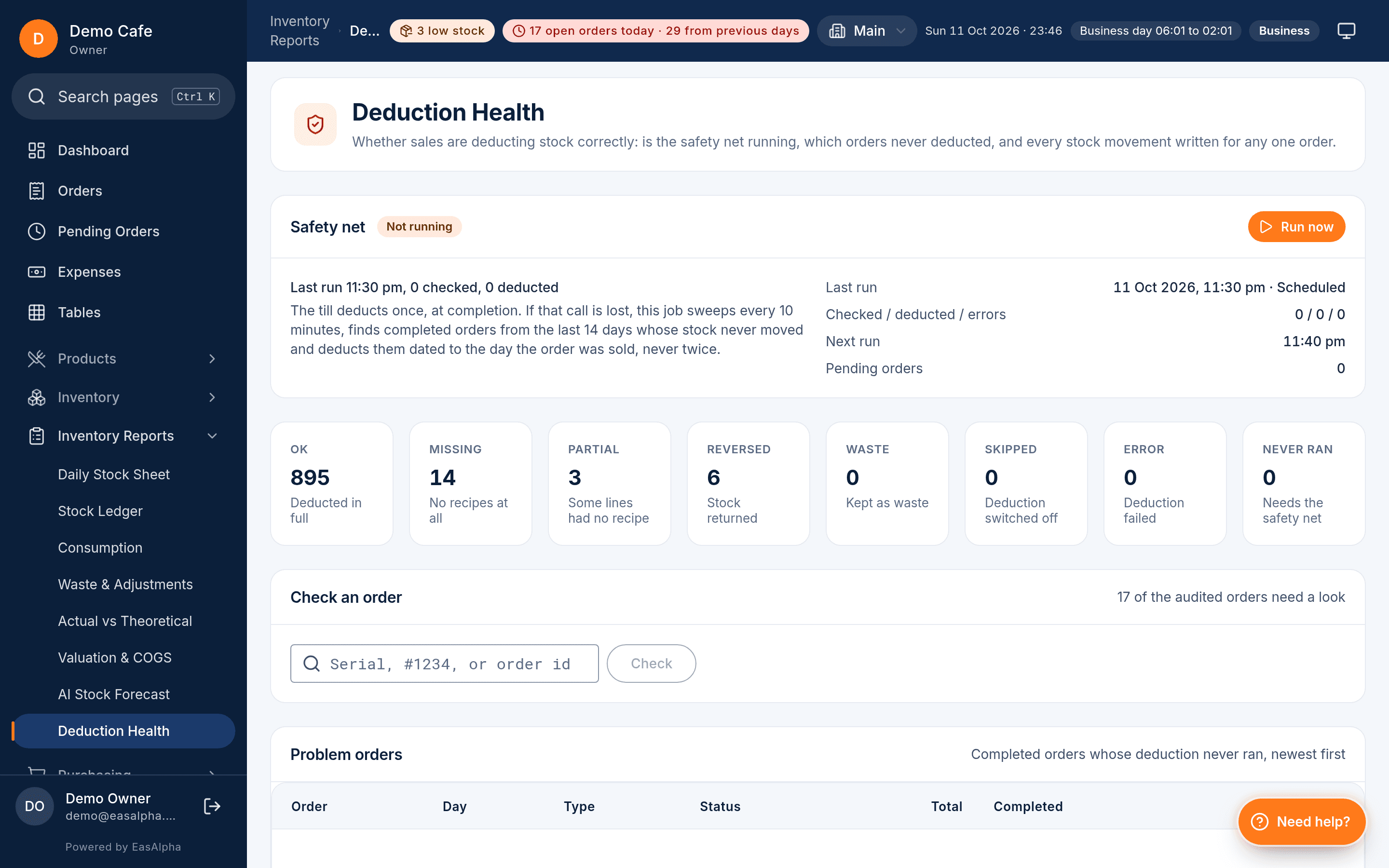
When an order completes, the server deducts each ingredient exactly once. A re-sent order, a reopened order or a till that was offline cannot deduct twice. Deduction Health shows deducted, pending and retried orders so a missed one is visible, not discovered at the count.
Nine document types, five statuses
Purchase, goods received, return, waste, adjustment, transfer, production, count and reset. Every movement of stock is a document with a status, a reason and a user, which is what makes the stock ledger believable.
Purchasing with a supplier ledger
Purchase orders go to the supplier, goods received update stock and the purchase price, returns and payments post to a debit-and-credit ledger per supplier. Price history flags a jump, and payables aging shows who is owed what and for how long.
Waste, consumption and actual vs theoretical
Waste and adjustments are documents too, with reasons. The consumption report shows what each item used over a period, and actual against theoretical compares it with what the recipes say should have been used, which is where portion sizes and pilferage show up.
Demand buckets and the daily stock sheet
Demand buckets sort items by how soon they run out at the current rate, so the morning order is a list, not a walk through the store. The daily stock sheet gives the counter a one-page opening, used and closing view per item.
Deduction Health
The screen that makes the stock figure trustworthy
Deduction Health lists every completed order with its deduction state: deducted, pending or retried. If a server hiccup or an odd recipe stops a deduction, the order sits in pending with a Retry button rather than silently leaving the stock too high. It is the first screen a manager opens when a count looks wrong.
- Deducted, pending and retried orders in one list with Retry
- A safety-net job re-checks completed orders on a schedule
- Stock ledger shows every movement by document, user and reason
Valuation and COGS
Stock in hand, valued, with cost of goods sold
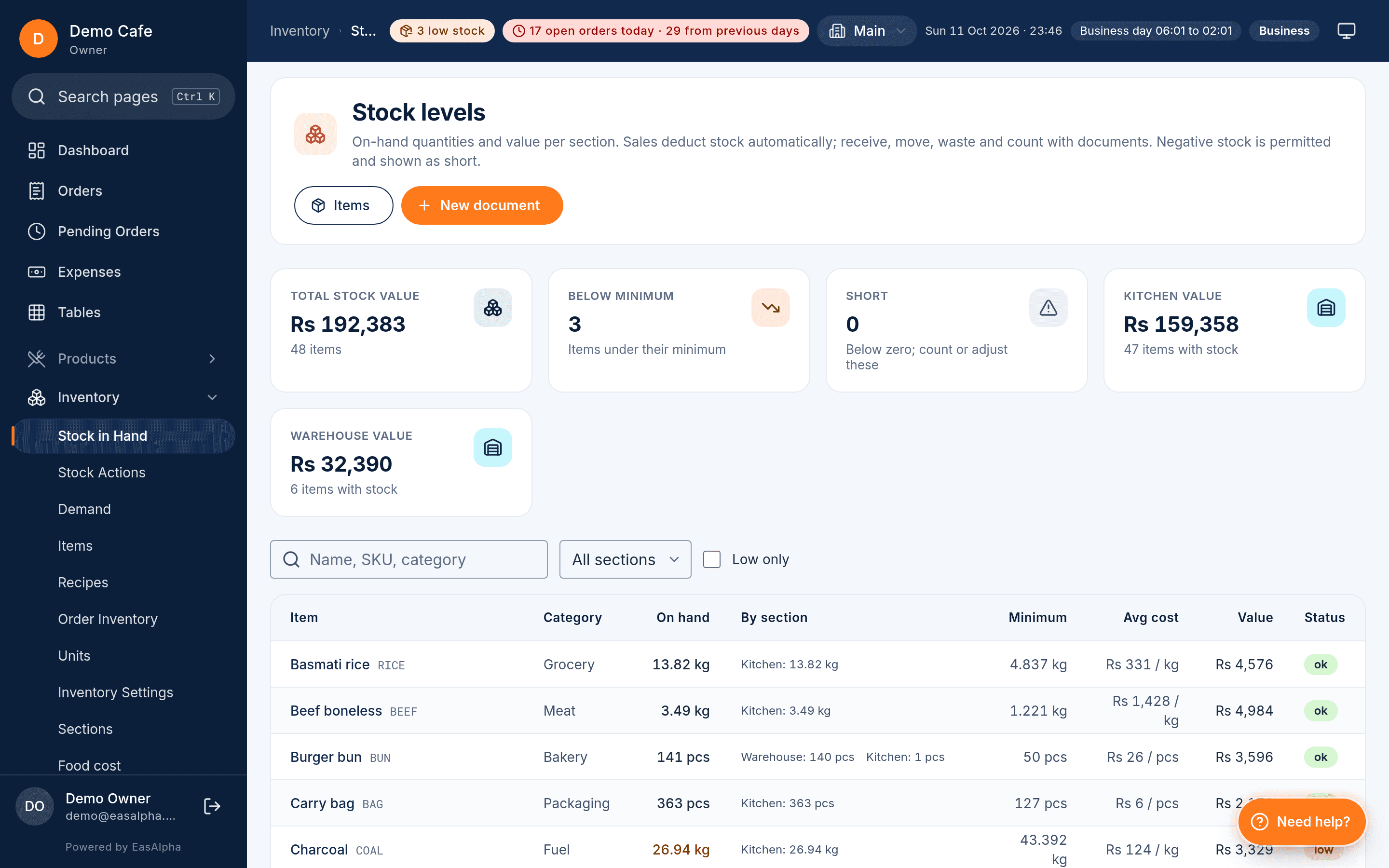
Stock in hand shows quantities and values by section at the purchase prices goods received recorded. Valuation and COGS put a figure on what the kitchen used over a period, and the food cost screen shows it per dish against its selling price, with overheads if you enter them. Two recipes losing money show up in the first week, not the first year.
- Stock in hand by section with quantities and values
- Valuation and cost of goods sold per period
- Food cost per dish against its price, with overheads
Purchasing
From the morning order to the supplier's statement
The morning starts in demand buckets: items sorted by how soon they run out at the current rate of use. Raise a purchase order per supplier from that list, receive it when the van arrives (goods received updates quantities and the purchase price), send back what is short or spoiled as a return, and record the payment. Each supplier has a debit-and-credit ledger with a running balance, payables aging shows what is overdue, and the purchase price history puts a verdict beside a price that jumped, so a quiet increase on tomatoes is caught at the receipt, not at the month end.
Production and transfers cover the rest: a batch of sauce made from raw items becomes a stock item of its own, and a transfer moves stock between sections or branches with both sides recorded. Consumables such as boxes and bags deduct per order type, so packaging is costed on takeaway and delivery but not on dine-in. If stock is new to you, message us and we will set the first twenty recipes up with you during the 90-day trial.
Questions
About inventory
Counting, outages, food cost, ordering and plans.
Do I have to count every ingredient before I can sell?
How does deduction cope with a power cut or a till that was offline?
Can I see the real food cost of a dish?
Does it tell me what to order?
Which plan includes inventory?
Know the food cost of every dish by next week
Import the menu, add the first recipes and watch the deductions. 90 days free, no card.
- 90-day free trial
- No card needed
- Set up in a day
Related
Keep reading
- Restaurant POS for PakistanFBR and PRA invoices, JazzCash and EasyPaisa, Urdu receipts, khata and a till that runs through load-shedding.Read the guide
- FBR POS integrationFiscal invoice numbers and QR codes on every receipt, queued when the internet is down, for FBR, PRA, SRB, KPRA and BRA.Read the guide
- Offline POS systemWhat the till does with no internet, how the queue syncs in order, and what Needs Attention catches.Read the guide